
 Türkçe
 English (US)
 Azərbaycanca
 ქართული
 العربية
 Deutsch
 Français
 Nederlands
 Español
 Português
 Italiano
 Polski
 Čeština
 Slovenčina
 Magyar
 Slovenščina
 Hrvatski
 Bosanski
 Srpski
 Македонски
 Shqip
Shqip Ελληνικά
 Română
 Български
 Русский
 Українська
 Svenska
 Dansk
Dansk Norsk bokmål
 Suomi
Suomi Íslenska
 Eesti
Eesti Latviešu
 Lietuvių
 Қазақша
 Oʻzbekcha
 Кыргызча
 Türkmençe
 Монгол
 日本語
日本語 한국어
한국어 Bahasa Indonesia
 Bahasa Melayu
 ไทย
ไทย Tiếng Việt
AutoCAD tool distribution — on-premises or cloud
Your company’s AutoCAD tools, in one place
Package the LISP, .NET and VBA tools your team has built over the years. Decide who gets which one, let updates reach each engineer’s machine on their own — without adding a single second to AutoCAD startup.
The demo takes an hour and uses your own tools. Pilot installations are free.
- 3AutoCAD releases: 2025, 2026, 2027
- 0Network calls during AutoCAD startup
- ECDSAEvery package signed; the client verifies too
- OfflineInstalled tools run with the server down
Runs on your own server or in our cloud. Installed on-premises, your drawings, your tools and your user list never leave your company.
Today
This is probably how it works now
None of the following is a mishap. Each one follows from how the tools are distributed — what you get when the tool is good and the delivery is not.
Nobody knows who is running which version
The tool travels on a network share or in an email. One engineer is on a copy from three months ago, another on the fixed one. The same drawing produces two different results, and it takes days to find out why.
AutoCAD takes too long to start
Every tool loads at startup. The more you have, the longer the wait — several times a day. Eventually engineers disable the tools they rarely need, and then cannot find them on the day they do.
The tool leaves with the person who wrote it
The author moves on. The source is on their machine, documentation never existed. The tool keeps running until an AutoCAD upgrade breaks it, and then nobody knows what to replace it with.
You cannot answer “who is using what”
A third-party add-in is licensed for five people. No record says how many are actually using it. When someone asks, the answer starts with “I think”.
Afterwards
Distribution becomes a decision
YPCad Hub does not change your tools; it makes them distributable. The LISP file you wrote stays the same LISP file.
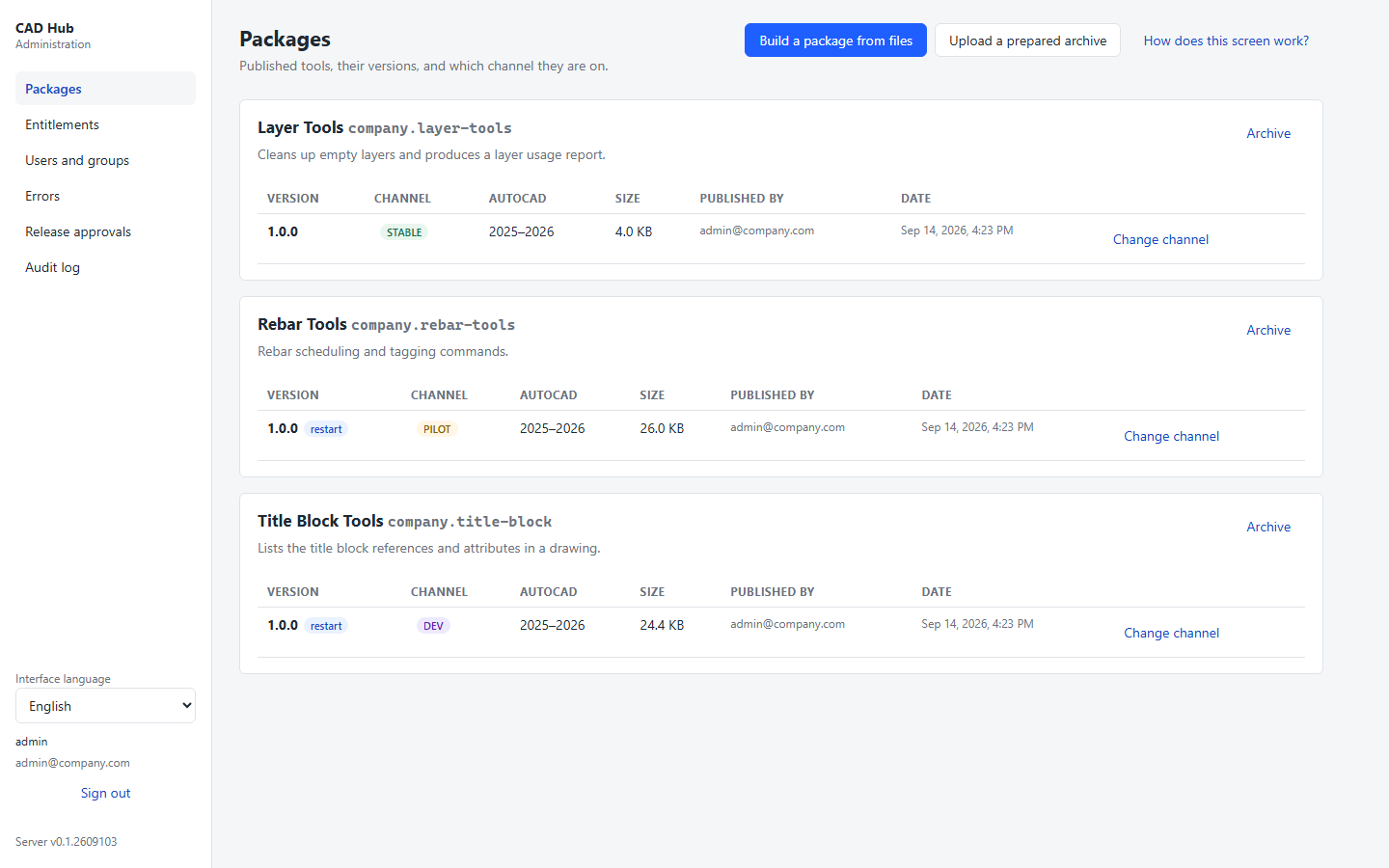
One catalogue, filtered per person
Engineers open the catalogue from inside AutoCAD and see only the tools they are entitled to. Installing is one click, and there is no such thing as a half-installed tool: it either completes or it never happened.
Loaded on demand
Tools load when a command is first called, not at startup. However large your catalogue grows, AutoCAD starts in the same time it does today.
Versions and release channels
A new version lands in DEV, then goes to a pilot group, then to everyone. If something is wrong, rolling back is a single action — and a rollback never waits for anyone’s approval.
Who published what, and when
Every release, every entitlement and every channel change is written to an audit trail that cannot be deleted. “How did this tool get here” is a query, not an investigation.
Trust
We run code on your engineers’ machines
Publishing a package means executing code on every machine that installs it. Every security decision in this product was weighed against that sentence.
Packages are signed — and the client verifies too
A SHA-256 hash only catches corruption in transit. A signature proves origin, and the signing private key is never on the server: whoever takes over the server cannot alter a package and re-sign it. The client verifies independently.
Optional four-eyes rule
Promoting a version to the whole company can require a second administrator’s approval, and the requester cannot approve their own request. Rolling back never requires approval — a control must not get in the way at the very moment speed matters most.
Works offline
Installed tools do not depend on the server. If it is down for maintenance or the network is cut, engineers keep working; only new installs and updates wait. No network request is ever made on the AutoCAD startup path.
You can see what you are installing
The installation folder ships with a machine-readable bill of materials (CycloneDX SBOM) and the database migration scripts. Your IT team can review what goes onto the server before it goes on.
Technical facts
Not a sales pitch — the questions your IT team will ask before installation.
- AutoCAD releases
- 2025, 2026, 2027
- Deployment
- Your own server or our cloud — Windows Service, systemd or Docker
- Database
- PostgreSQL or SQL Server
- Sign-in
- Passwordless: one-time code by email
- Admin panel
- Included with the server application; no separate Node.js installation
- Interface languages
- Turkish, English, Azerbaijani
- Internet access
- Not required — nothing in the product phones home
See it with your own tools
A demo here is not a slide deck: we package one of your own LISP or .NET tools, publish it to a catalogue and install it from inside AutoCAD. An hour is enough to understand what you are buying.